<?xml version="1.0" encoding="utf-8"?><feed xmlns="http://www.w3.org/2005/Atom" ><generator uri="https://jekyllrb.com/" version="4.4.1">Jekyll</generator><link href="https://debashiscodes.github.io/feed.xml" rel="self" type="application/atom+xml" /><link href="https://debashiscodes.github.io/" rel="alternate" type="text/html" /><updated>2026-10-22T15:47:25+00:00</updated><id>https://debashiscodes.github.io/feed.xml</id><title type="html">Debashis Biswal</title><entry><title type="html">On Ruby’s Garbage Collection</title><link href="https://debashiscodes.github.io/ruby/2025/11/23/on-ruby's-garbage-collection.html" rel="alternate" type="text/html" title="On Ruby’s Garbage Collection" /><published>2025-11-23T05:58:41+00:00</published><updated>2025-11-23T05:58:41+00:00</updated><id>https://debashiscodes.github.io/ruby/2025/11/23/on-ruby&apos;s-garbage-collection</id><content type="html" xml:base="https://debashiscodes.github.io/ruby/2025/11/23/on-ruby&apos;s-garbage-collection.html"><![CDATA[<p>When you run a Ruby app (say a Rails app), it doesn’t exist in thin air.</p>

<p>It has to live somewhere — and that <code class="language-plaintext highlighter-rouge">somewhere</code> is RAM of a machine.</p>

<p>So in a Rails Application, the moment you boot your Rails server with <code class="language-plaintext highlighter-rouge">rails s</code>, your machine allocates memory for it in the RAM. Rails loads code, sets up the framework, and keeps things ready to respond to requests. That baseline memory usage is basically the “cost of being alive”.</p>

<p>Then you open a browser, hit a page, and… memory goes up again.
Memory increases because a request isn’t just <code class="language-plaintext highlighter-rouge">show HTML</code>.
A request is more like: Rails waking up, matching routes, running controller code, talking to the database, building objects, rendering templates, and sending a response back.</p>

<p>That involves extra work (and extra memory), such as loading more classes.
Rails also creates lots of objects per request: params, controller instances, strings, arrays, hashes, view objects, and more. Ruby is very object-heavy by nature, and that’s normal.</p>

<p>And when ActiveRecord loads data, it converts database rows into Ruby objects. One row becomes one ActiveRecord object, and a query returning 500 rows becomes hundreds of Ruby objects in memory.</p>

<p>So yes — RAM usage increases, and that’s expected behavior.</p>

<h2 id="what-happens-when-a-ruby-app-hits-100-ram">What Happens When a Ruby App Hits 100% RAM</h2>
<p>If your machine has 8 GB of RAM, and your Rails app keeps using all 8 GB, the system basically has no space left for the OS, the database, background workers, or even basic housekeeping.</p>

<p>So the machine starts fighting for memory instead of doing real work. That’s when everything begins to feel stuck. Requests get slower, pages start hanging, and baackground jobs fall behind.</p>

<p>In practice, Ruby usually won’t let you hit true 100% RAM usage and keep going like nothing happened.</p>

<p>Ruby has a built-in Garbage Collector (GC) that’s constantly watching memory in the background. When Ruby notices memory pressure — like when there aren’t enough free slots left to allocate new objects — it decides it’s time to clean and free objects from the memory.</p>

<p>So GC kicks in and figures out what’s no longer reachable, and frees that space — basically buying Ruby more room to keep running before things hit a complete wall.</p>

<h2 id="ruby-gc-module--the-cleaner-you-dont-see">Ruby GC Module — The Cleaner You Don’t See</h2>

<p>Ruby has a cleaner working quietly in the background. That cleaner is GC (Garbage Collector).</p>

<p>In Ruby, almost everything is an object — like a string, an array, or a hash. And every object needs memory.</p>

<p>A Ruby object gets allocated on the heap, and the heap lives in RAM. So as your program runs, Ruby keeps putting more objects into that heap, and RAM usage slowly grows.</p>

<p>So far, it’s fine… until your program starts creating thousands of objects.</p>

<p>That’s where Ruby’s GC comes in. Ruby has a garbage collector that tries to free memory by removing objects that are no longer needed.</p>

<p>But the important part is this: Ruby GC removes objects that are not reachable anymore.</p>

<p>Not “unused”. Not “old”. Not “forgotten”. Only unreachable.</p>

<p>“Unreachable” means Ruby can’t access the object from anywhere in your running code.</p>

<p>For example, if you create an object and then remove the only variable pointing to it, Ruby has no way to access it anymore — so it becomes garbage and GC can clean it.</p>

<p>But if something still references that object, then it’s still reachable.</p>

<p>Even if you personally don’t care about it anymore, Ruby sees that it’s still referenced, so it keeps it in memory. GC basically says: “Not touching this. Someone still owns it.”</p>

<p>Ruby GC works using a simple idea called Mark &amp; Sweep.</p>

<p>First, it marks all objects that are reachable from the “root” objects.</p>

<p>Then it sweeps and deletes everything that wasn’t marked.</p>

<p>That’s why it’s called Mark and Sweep.</p>

<p>Now here’s an important point: GC can’t fix every memory problem.</p>

<p>If you store things in something that always stays reachable — like a global cache — those objects will never become unreachable, so GC will never remove them.</p>

<p>Even if you never use those cached objects again, they’re still referenced, so they stay. That’s not garbage. It’s more like “reachable garbage” 😅</p>

<p>Yes, Ruby GC runs automatically.</p>

<p>But it doesn’t run every second. It usually runs when Ruby feels memory pressure.</p>

<p>That’s why your app can feel smooth… and then suddenly pause for a moment. That pause is often the GC doing its job.</p>

<h2 id="manually-clear-garbage">Manually Clear Garbage</h2>

<p>You can manually trigger GC using</p>

<div class="language-ruby highlighter-rouge"><div class="highlight"><pre class="highlight"><code><span class="no">GC</span><span class="p">.</span><span class="nf">start</span>
</code></pre></div></div>
<p>but you usually shouldn’t do it repeatedly.</p>

<p>GC itself is expensive, and forcing it too often can make performance worse.</p>

<div class="language-ruby highlighter-rouge"><div class="highlight"><pre class="highlight"><code><span class="no">GC</span><span class="p">.</span><span class="nf">compact</span>
</code></pre></div></div>

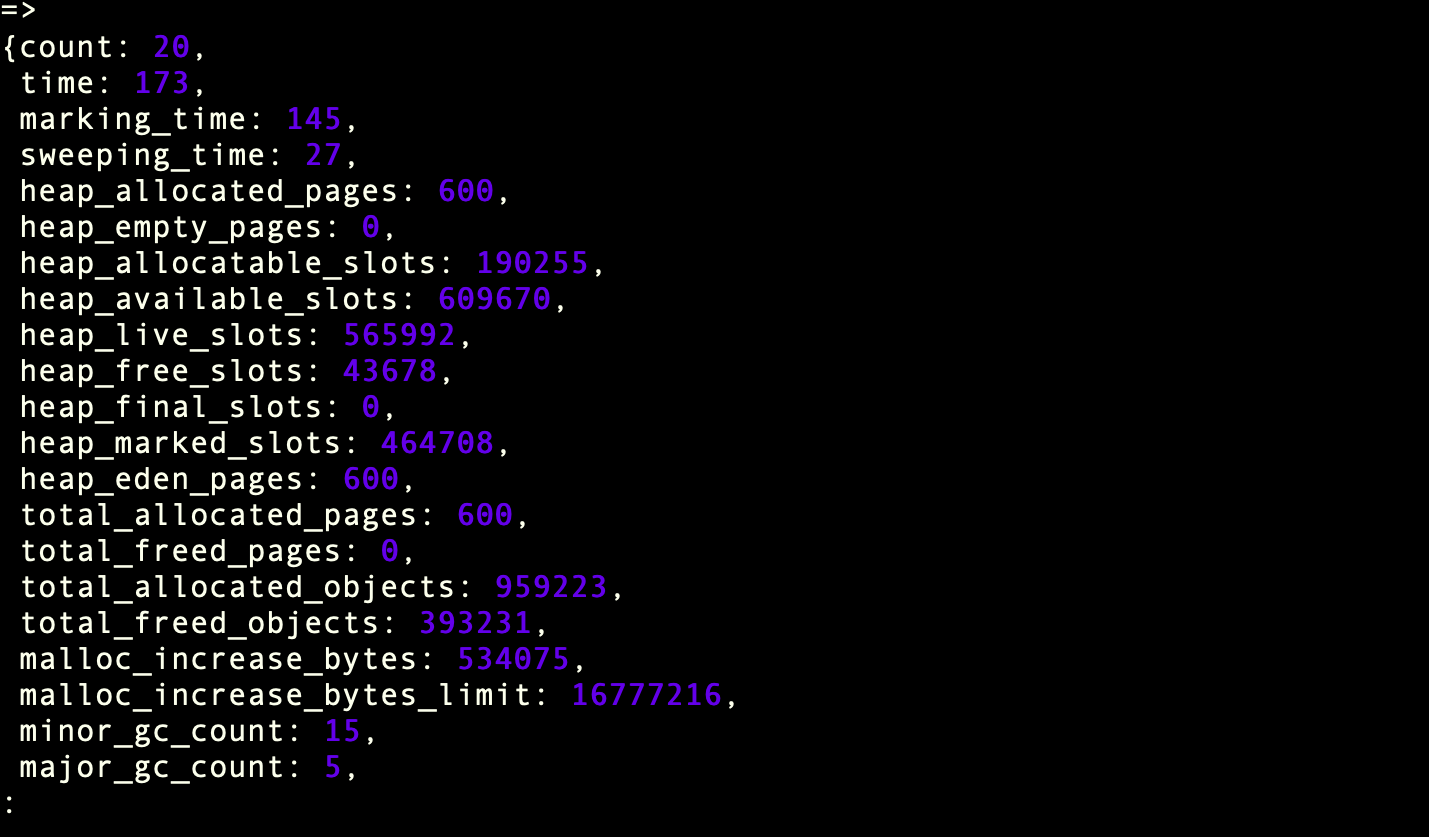
<p>If you want to inspect what GC is doing, you can check statistics using</p>

<div class="language-ruby highlighter-rouge"><div class="highlight"><pre class="highlight"><code><span class="no">GC</span><span class="p">.</span><span class="nf">stat</span>
</code></pre></div></div>
<p><img src="/assets/gc_stat.png" alt="exists" /></p>

<p>This shows details like how many collections happened, how many objects exist, and memory-related numbers.</p>

<p>The simple rule to remember is: if nothing references an object, GC can remove it. If something still references it, it stays.</p>

<p>Ruby GC is helpful — but it only cleans what you truly let go.</p>

<h2 id="ruby-memory-terms">Ruby Memory Terms</h2>

<p>After you understand GC, these words stop feeling scary.</p>

<h3 id="1--memory-leak-ram-only-goes-up"><strong>1.</strong>  Memory Leak (RAM Only Goes Up)</h3>

<p>A memory leak means your app’s memory keeps increasing and never comes back down.</p>

<p>Why?</p>

<p>Because some objects are still being held somewhere, so GC can’t clean them.</p>

<p>Common causes:</p>

<ul>
  <li>globals/constants holding data forever</li>
  <li>caches that never expire</li>
  <li>class variables / singletons storing more and more</li>
  <li>callbacks/subscriptions that never get removed</li>
</ul>

<p>Example:</p>

<div class="language-ruby highlighter-rouge"><div class="highlight"><pre class="highlight"><code><span class="vg">$store</span> <span class="o">=</span> <span class="p">[]</span>

<span class="kp">loop</span> <span class="k">do</span>
  <span class="vg">$store</span> <span class="o">&lt;&lt;</span> <span class="s2">"data"</span> <span class="o">*</span> <span class="mi">1000</span>
<span class="k">end</span>
</code></pre></div></div>

<p>GC can’t help here because <code class="language-plaintext highlighter-rouge">$store</code> references everything forever.</p>

<h3 id="2-memory-bloat-not-a-leak-just-heavy"><strong>2.</strong> Memory Bloat (Not a Leak, Just Heavy)</h3>

<p>Memory bloat is when your app uses a lot of RAM…</p>

<p>…but it’s not a leak.</p>

<p>It can be freed later.</p>

<p>Example:</p>

<div class="language-ruby highlighter-rouge"><div class="highlight"><pre class="highlight"><code><span class="n">big</span> <span class="o">=</span> <span class="no">Array</span><span class="p">.</span><span class="nf">new</span><span class="p">(</span><span class="mi">10_000_000</span><span class="p">,</span> <span class="s2">"x"</span><span class="p">)</span>
</code></pre></div></div>

<p>That’s not leaking.</p>

<p>That’s just a big object.</p>

<h3 id="3-object-retention-the-silent-troublemaker"><strong>3.</strong> Object Retention (The Silent Troublemaker)</h3>

<p>This means your code is keeping objects alive longer than needed.</p>

<p>Example:</p>

<div class="language-ruby highlighter-rouge"><div class="highlight"><pre class="highlight"><code><span class="vi">@memo</span> <span class="o">||=</span> <span class="n">expensive_object</span>
</code></pre></div></div>

<p>Memoization is useful.</p>

<p>But sometimes it’s basically saying:</p>

<blockquote>
  <p>“Keep this big thing forever.”</p>
</blockquote>

<h3 id="4-gc-pressure-too-much-garbage"><strong>4.</strong> GC Pressure (Too Much Garbage)</h3>

<p>GC pressure means you create too many short-lived objects.</p>

<p>Ruby has to run GC again and again.</p>

<p>Example:</p>

<div class="language-ruby highlighter-rouge"><div class="highlight"><pre class="highlight"><code><span class="mi">1_000_000</span><span class="p">.</span><span class="nf">times</span> <span class="p">{</span> <span class="s2">"a"</span> <span class="o">+</span> <span class="s2">"b"</span> <span class="p">}</span>
</code></pre></div></div>

<p>Temporary objects everywhere → GC works harder → app slows down.</p>

<h3 id="5-heap-where-ruby-stores-objects"><strong>5.</strong> Heap (Where Ruby Stores Objects)</h3>

<p>Heap is the memory area where Ruby stores:</p>

<ul>
  <li>strings</li>
  <li>arrays</li>
  <li>hashes</li>
  <li>objects</li>
</ul>

<p>Heap grows → RAM grows.</p>

<h3 id="6-rss-what-os-shows-as-memory"><strong>6.</strong> RSS (What OS Shows as Memory)</h3>

<p>RSS is what <code class="language-plaintext highlighter-rouge">top</code>, <code class="language-plaintext highlighter-rouge">htop</code>, and containers show as memory usage.</p>

<p>Important:</p>

<p>✅ GC may clean objects
❗ RSS might still look high</p>

<p>Because Ruby doesn’t always return memory to OS quickly.</p>

<h3 id="7-fragmentation-free-memory-exists-but-its-messy"><strong>7.</strong> Fragmentation (Free Memory Exists, But It’s Messy)</h3>

<p>Fragmentation means there is free memory…</p>

<p>…but it’s broken into small pieces.</p>

<p>Ruby may not find good space, so it grows heap again.</p>

<h3 id="8-out-of-memory-oom"><strong>8.</strong> Out Of Memory (OOM)</h3>

<p>OOM happens when your app hits memory limit and gets killed.</p>

<p>Common reasons:</p>

<ul>
  <li>memory leak</li>
  <li>sudden bloat</li>
  <li>too much data loaded at once</li>
  <li>huge query result in memory</li>
</ul>

<p>The “game over” moment.</p>

<h3 id="9-thrashing-gc-is-too-busy"><strong>9.</strong> Thrashing (GC Is Too Busy)</h3>

<p>Thrashing means GC runs so often that your app spends more time cleaning than working.</p>

<p>Symptoms:</p>

<ul>
  <li>high CPU</li>
  <li>slow responses</li>
  <li>too many GC cycles</li>
</ul>

<h3 id="10-generational-gc-rubys-smart-cleaning"><strong>10.</strong> Generational GC (Ruby’s Smart Cleaning)</h3>

<p>Ruby groups objects by age:</p>

<ul>
  <li>young objects → collected often</li>
  <li>old objects → collected less</li>
</ul>

<p>This makes GC faster because Ruby doesn’t waste time scanning old stable objects again and again.</p>

<!-- ## How To Avoid Memory Leak -->
<!-- - [ ] Task description -->
<!-- - [ ] Another completed task -->]]></content><author><name></name></author><category term="Ruby" /><summary type="html"><![CDATA[When you run a Ruby app (say a Rails app), it doesn’t exist in thin air.]]></summary></entry><entry><title type="html">Rails Performance Tip: Check Record Existence Efficiently</title><link href="https://debashiscodes.github.io/rails/2025/11/22/rails-performance-tip-check-record-existence-efficiently.html" rel="alternate" type="text/html" title="Rails Performance Tip: Check Record Existence Efficiently" /><published>2025-11-22T05:58:41+00:00</published><updated>2025-11-22T05:58:41+00:00</updated><id>https://debashiscodes.github.io/rails/2025/11/22/rails-performance-tip-check-record-existence-efficiently</id><content type="html" xml:base="https://debashiscodes.github.io/rails/2025/11/22/rails-performance-tip-check-record-existence-efficiently.html"><![CDATA[<p>There are different ways to check whether a record exists in a database in Rails. Methods like present?, any?, empty?, and exists? can be used to check if a record is present in the database.</p>

<p>Generally, these methods return true if the record exists and false if it doesn’t. However, they differ in how they load and check the record.</p>

<h2 id="schema">Schema</h2>
<p><img src="/assets/schema.png" alt="exists" /></p>

<h2 id="present">.present?</h2>
<p><img src="/assets/present.png" alt="present?" /></p>

<p>The .present? method in the above ActiveRecord query first loads the data into memory, creates ActiveRecord objects, and then checks whether the result is empty or not. If it’s not empty, it returns true; otherwise, it returns false.</p>

<p>This approach takes more time because it loads records into memory. For large datasets, it can be slower.</p>
<h2 id="any">.any?</h2>
<p><img src="/assets/any.png" alt="Alt text for the image" /></p>

<h2 id="empty">.empty?</h2>
<p><img src="/assets/empty.png" alt="Alt text for the image" /></p>

<h2 id="exists">.exists?</h2>
<p><img src="/assets/exists.png" alt="Alt text for the image" /></p>

<p>The above three methods are faster than .present? because they use a SELECT 1 with LIMIT 1 approach.</p>]]></content><author><name></name></author><category term="Rails" /><summary type="html"><![CDATA[There are different ways to check whether a record exists in a database in Rails. Methods like present?, any?, empty?, and exists? can be used to check if a record is present in the database.]]></summary></entry><entry><title type="html">Database Indexing in Rails (or: Why your queries are slow and what to do about it)</title><link href="https://debashiscodes.github.io/rails/2025/08/18/database-indexing-in-rails.html" rel="alternate" type="text/html" title="Database Indexing in Rails (or: Why your queries are slow and what to do about it)" /><published>2025-08-18T05:58:41+00:00</published><updated>2025-08-18T05:58:41+00:00</updated><id>https://debashiscodes.github.io/rails/2025/08/18/database-indexing-in-rails</id><content type="html" xml:base="https://debashiscodes.github.io/rails/2025/08/18/database-indexing-in-rails.html"><![CDATA[<p>That moment when your app suddenly feels like molasses…</p>

<p>So there’s this Rails app that worked great in development. 100 users, lightning fast. Then it hits production with 10,000 users and suddenly every page takes 5+ seconds to load. Database CPU is pegged at 100%. Users are complaining.</p>

<p>The culprit? A simple <code class="language-plaintext highlighter-rouge">User.where(email: params[:email])</code> query that worked fine with 50 test users but becomes a nightmare when scanning through 100,000 records one by one.</p>

<p>That’s when someone mentions “indexing” and suddenly everything clicks.</p>

<h3 id="1-what-database-indexing-actually-is-library-book-analogy"><strong>1.</strong> What database indexing actually is (library book analogy)</h3>

<p>Imagine you’re in a huge library looking for a book about “Ruby programming.” Without an index (catalog system), you’d have to check every single book on every shelf. That could take hours.</p>

<p>With an index, you look up “Ruby programming” in the catalog, and it tells you exactly which shelf and section to check. Boom - book found in 30 seconds.</p>

<p>Database indexes work the same way. Instead of scanning every row in a table, the database uses the index to jump straight to the relevant records.</p>

<h3 id="2-the-postgresql-index-types-that-actually-matter"><strong>2.</strong> The PostgreSQL index types that actually matter</h3>

<h4 id="b-tree-index-the-workhorse"><code class="language-plaintext highlighter-rouge">B-Tree Index (the workhorse)</code></h4>
<p>This is the default and handles 95% of your needs:</p>

<div class="language-ruby highlighter-rouge"><div class="highlight"><pre class="highlight"><code><span class="c1"># Rails migration</span>
<span class="n">add_index</span> <span class="ss">:users</span><span class="p">,</span> <span class="ss">:email</span>
<span class="n">add_index</span> <span class="ss">:posts</span><span class="p">,</span> <span class="ss">:user_id</span>
</code></pre></div></div>
<p><strong>What it’s good for:</strong> Equality searches, range queries, sorting
<strong>Example queries it speeds up:</strong></p>
<ul>
  <li><code class="language-plaintext highlighter-rouge">User.where(email: 'john@example.com')</code></li>
  <li><code class="language-plaintext highlighter-rouge">Post.where(user_id: 123)</code></li>
  <li><code class="language-plaintext highlighter-rouge">Order.where(created_at: 1.week.ago..Time.current)</code></li>
</ul>

<h4 id="partial-index-the-selective-one"><code class="language-plaintext highlighter-rouge">Partial Index (the selective one)</code></h4>
<p>Only indexes rows that meet certain conditions:</p>

<div class="language-ruby highlighter-rouge"><div class="highlight"><pre class="highlight"><code><span class="c1"># Only index active users</span>
<span class="n">add_index</span> <span class="ss">:users</span><span class="p">,</span> <span class="ss">:email</span><span class="p">,</span> <span class="ss">where: </span><span class="s2">"active = true"</span>

<span class="c1"># Only index published posts</span>
<span class="n">add_index</span> <span class="ss">:posts</span><span class="p">,</span> <span class="ss">:created_at</span><span class="p">,</span> <span class="ss">where: </span><span class="s2">"status = 'published'"</span>
</code></pre></div></div>

<p><strong>Why it’s clever:</strong> Smaller index, faster queries for common cases
<strong>When to use:</strong> When you mostly query a subset of records</p>

<h4 id="unique-index-the-enforcer"><code class="language-plaintext highlighter-rouge">Unique Index (the enforcer)</code></h4>
<p>Prevents duplicate values and speeds up lookups:</p>

<div class="language-ruby highlighter-rouge"><div class="highlight"><pre class="highlight"><code><span class="c1"># Automatically creates unique index</span>
<span class="n">add_index</span> <span class="ss">:users</span><span class="p">,</span> <span class="ss">:email</span><span class="p">,</span> <span class="ss">unique: </span><span class="kp">true</span>

<span class="c1"># Composite unique index</span>
<span class="n">add_index</span> <span class="ss">:user_profiles</span><span class="p">,</span> <span class="p">[</span><span class="ss">:user_id</span><span class="p">,</span> <span class="ss">:profile_type</span><span class="p">],</span> <span class="ss">unique: </span><span class="kp">true</span>
</code></pre></div></div>

<p><strong>Bonus:</strong> Rails validates uniqueness at the application level, but unique indexes enforce it at the database level too.</p>

<h4 id="gin-index-the-full-text-search-hero"><code class="language-plaintext highlighter-rouge">GIN Index (the full-text search hero)</code></h4>
<p>Perfect for JSON columns and full-text search:</p>

<div class="language-ruby highlighter-rouge"><div class="highlight"><pre class="highlight"><code><span class="c1"># For JSONB columns</span>
<span class="n">add_index</span> <span class="ss">:products</span><span class="p">,</span> <span class="ss">:metadata</span><span class="p">,</span> <span class="ss">using: </span><span class="s1">'gin'</span>

<span class="c1"># For full-text search</span>
<span class="n">add_index</span> <span class="ss">:articles</span><span class="p">,</span> <span class="ss">:title</span><span class="p">,</span> <span class="ss">using: </span><span class="s1">'gin'</span><span class="p">,</span> <span class="ss">opclass: :gin_trgm_ops</span>
</code></pre></div></div>

<p><strong>Use case:</strong> When you’re searching inside JSON data or doing complex text searches</p>

<h3 id="3-how-to-add-indexes-in-rails-the-right-way"><strong>3.</strong> How to add indexes in Rails (the right way)</h3>

<h4 id="basic-single-column-index">Basic single column index</h4>
<div class="language-ruby highlighter-rouge"><div class="highlight"><pre class="highlight"><code><span class="k">class</span> <span class="nc">AddIndexToUsersEmail</span> <span class="o">&lt;</span> <span class="no">ActiveRecord</span><span class="o">::</span><span class="no">Migration</span><span class="p">[</span><span class="mf">7.0</span><span class="p">]</span>
  <span class="k">def</span> <span class="nf">change</span>
    <span class="n">add_index</span> <span class="ss">:users</span><span class="p">,</span> <span class="ss">:email</span>
  <span class="k">end</span>
<span class="k">end</span>
</code></pre></div></div>

<h4 id="composite-index-order-matters">Composite index (order matters!)</h4>
<div class="language-ruby highlighter-rouge"><div class="highlight"><pre class="highlight"><code><span class="c1"># For queries like: Post.where(user_id: 123, status: 'published')</span>
<span class="n">add_index</span> <span class="ss">:posts</span><span class="p">,</span> <span class="p">[</span><span class="ss">:user_id</span><span class="p">,</span> <span class="ss">:status</span><span class="p">]</span>

<span class="c1"># NOT the same as:</span>
<span class="n">add_index</span> <span class="ss">:posts</span><span class="p">,</span> <span class="p">[</span><span class="ss">:status</span><span class="p">,</span> <span class="ss">:user_id</span><span class="p">]</span>  <span class="c1"># Different order!</span>
</code></pre></div></div>

<h4 id="concurrent-index-creation-for-large-tables">Concurrent index creation (for large tables)</h4>
<div class="language-ruby highlighter-rouge"><div class="highlight"><pre class="highlight"><code><span class="k">class</span> <span class="nc">AddIndexConcurrently</span> <span class="o">&lt;</span> <span class="no">ActiveRecord</span><span class="o">::</span><span class="no">Migration</span><span class="p">[</span><span class="mf">7.0</span><span class="p">]</span>
  <span class="n">disable_ddl_transaction!</span>

  <span class="k">def</span> <span class="nf">change</span>
    <span class="n">add_index</span> <span class="ss">:large_table</span><span class="p">,</span> <span class="ss">:some_column</span><span class="p">,</span> <span class="ss">algorithm: :concurrently</span>
  <span class="k">end</span>
<span class="k">end</span>
</code></pre></div></div>

<p><strong>Why concurrent:</strong> Doesn’t lock the table during creation (crucial for production)</p>

<h3 id="4-how-to-know-when-you-need-an-index"><strong>4.</strong> How to know when you need an index</h3>

<h4 id="the-obvious-signs">The obvious signs</h4>
<ul>
  <li>Queries taking more than 200ms consistently</li>
  <li>High database CPU usage</li>
  <li>Users complaining about slow pages</li>
  <li>Your monitoring showing database as the bottleneck</li>
</ul>

<h4 id="the-detective-work">The detective work</h4>
<div class="language-ruby highlighter-rouge"><div class="highlight"><pre class="highlight"><code><span class="c1"># Enable query logging in development</span>
<span class="c1"># config/environments/development.rb</span>
<span class="n">config</span><span class="p">.</span><span class="nf">log_level</span> <span class="o">=</span> <span class="ss">:debug</span>

<span class="c1"># Look for queries like this in your logs:</span>
<span class="c1"># User Load (2000.0ms) SELECT "users".* FROM "users" WHERE "users"."email" = $1</span>
</code></pre></div></div>

<h4 id="use-explain-your-best-friend">Use EXPLAIN (your best friend)</h4>
<div class="language-sql highlighter-rouge"><div class="highlight"><pre class="highlight"><code><span class="c1">-- In Rails console</span>
<span class="k">User</span><span class="p">.</span><span class="k">where</span><span class="p">(</span><span class="n">email</span><span class="p">:</span> <span class="s1">'test@example.com'</span><span class="p">).</span><span class="k">explain</span>

<span class="c1">-- Raw SQL</span>
<span class="k">EXPLAIN</span> <span class="k">ANALYZE</span> <span class="k">SELECT</span> <span class="o">*</span> <span class="k">FROM</span> <span class="n">users</span> <span class="k">WHERE</span> <span class="n">email</span> <span class="o">=</span> <span class="s1">'test@example.com'</span><span class="p">;</span>
</code></pre></div></div>

<p><strong>What to look for:</strong></p>
<ul>
  <li>“Seq Scan” = bad (scanning entire table)</li>
  <li>“Index Scan” = good (using an index)</li>
  <li>High “cost” numbers = probably need an index</li>
</ul>

<h4 id="the-gem-that-does-the-detective-work">The gem that does the detective work</h4>
<div class="language-ruby highlighter-rouge"><div class="highlight"><pre class="highlight"><code><span class="c1"># Gemfile</span>
<span class="n">gem</span> <span class="s1">'bullet'</span><span class="p">,</span> <span class="ss">group: :development</span>

<span class="c1"># Finds missing indexes automatically</span>
<span class="c1"># Shows notifications when queries would benefit from indexes</span>
</code></pre></div></div>

<h3 id="5-when-to-remove-indexes-yes-this-is-a-thing"><strong>5.</strong> When to remove indexes (yes, this is a thing)</h3>

<h4 id="indexes-you-probably-dont-need">Indexes you probably don’t need</h4>
<div class="language-ruby highlighter-rouge"><div class="highlight"><pre class="highlight"><code><span class="c1"># Remove unused indexes</span>
<span class="n">remove_index</span> <span class="ss">:table_name</span><span class="p">,</span> <span class="ss">:rarely_queried_column</span>

<span class="c1"># Remove redundant indexes</span>
<span class="c1"># If you have these two:</span>
<span class="n">add_index</span> <span class="ss">:posts</span><span class="p">,</span> <span class="ss">:user_id</span>
<span class="n">add_index</span> <span class="ss">:posts</span><span class="p">,</span> <span class="p">[</span><span class="ss">:user_id</span><span class="p">,</span> <span class="ss">:created_at</span><span class="p">]</span>
<span class="c1"># The first one is redundant (composite index covers it)</span>
</code></pre></div></div>

<h4 id="signs-an-index-should-go">Signs an index should go</h4>
<ul>
  <li>Table has tons of writes but few reads</li>
  <li>Index is never used (check with database stats)</li>
  <li>Too many indexes on one table (slowing down writes)</li>
</ul>

<h4 id="finding-unused-indexes">Finding unused indexes</h4>
<div class="language-sql highlighter-rouge"><div class="highlight"><pre class="highlight"><code><span class="c1">-- PostgreSQL query to find unused indexes</span>
<span class="k">SELECT</span>
  <span class="n">schemaname</span><span class="p">,</span> <span class="n">tablename</span><span class="p">,</span> <span class="n">indexname</span><span class="p">,</span> <span class="n">idx_scan</span>
<span class="k">FROM</span> <span class="n">pg_stat_user_indexes</span>
<span class="k">WHERE</span> <span class="n">idx_scan</span> <span class="o">=</span> <span class="mi">0</span><span class="p">;</span>
</code></pre></div></div>

<h3 id="6-the-rails-developers-indexing-checklist"><strong>6.</strong> The Rails developer’s indexing checklist</h3>

<h4 id="always-index-these">Always index these</h4>
<div class="language-ruby highlighter-rouge"><div class="highlight"><pre class="highlight"><code><span class="c1"># Foreign keys (Rails doesn't do this automatically!)</span>
<span class="n">add_index</span> <span class="ss">:posts</span><span class="p">,</span> <span class="ss">:user_id</span>
<span class="n">add_index</span> <span class="ss">:comments</span><span class="p">,</span> <span class="ss">:post_id</span>

<span class="c1"># Fields you use in WHERE clauses</span>
<span class="n">add_index</span> <span class="ss">:users</span><span class="p">,</span> <span class="ss">:email</span>
<span class="n">add_index</span> <span class="ss">:posts</span><span class="p">,</span> <span class="ss">:status</span>

<span class="c1"># Fields you ORDER BY frequently</span>
<span class="n">add_index</span> <span class="ss">:posts</span><span class="p">,</span> <span class="ss">:created_at</span>
</code></pre></div></div>

<h4 id="think-twice-about-indexing-these">Think twice about indexing these</h4>
<div class="language-ruby highlighter-rouge"><div class="highlight"><pre class="highlight"><code><span class="c1"># Boolean columns (usually not worth it)</span>
<span class="n">add_index</span> <span class="ss">:users</span><span class="p">,</span> <span class="ss">:active</span>  <span class="c1"># Probably skip this</span>

<span class="c1"># Columns that change frequently</span>
<span class="n">add_index</span> <span class="ss">:posts</span><span class="p">,</span> <span class="ss">:view_count</span>  <span class="c1"># Gets updated constantly</span>

<span class="c1"># Very short tables</span>
<span class="n">add_index</span> <span class="ss">:settings</span><span class="p">,</span> <span class="ss">:key</span>  <span class="c1"># If you only have 10 settings</span>
</code></pre></div></div>

<h3 id="7-the-performance-impact-real-numbers"><strong>7.</strong> The performance impact (real numbers)</h3>

<h4 id="query-speed-improvements">Query speed improvements</h4>
<ul>
  <li><strong>No index:</strong> 5000ms for 100k records</li>
  <li><strong>With index:</strong> 5ms for the same query</li>
  <li><strong>Improvement:</strong> 1000x faster (seriously)</li>
</ul>

<h4 id="write-performance-impact">Write performance impact</h4>
<ul>
  <li><strong>Each index:</strong> ~10-30% slower INSERTs/UPDATEs</li>
  <li><strong>10 indexes on a table:</strong> INSERTs can be 3x slower</li>
  <li><strong>Sweet spot:</strong> 3-5 indexes per table max</li>
</ul>

<h3 id="8-common-indexing-mistakes-rails-developers-make"><strong>8.</strong> Common indexing mistakes Rails developers make</h3>

<h4 id="the-index-everything-approach">The “index everything” approach</h4>
<div class="language-ruby highlighter-rouge"><div class="highlight"><pre class="highlight"><code><span class="c1"># DON'T do this</span>
<span class="n">add_index</span> <span class="ss">:users</span><span class="p">,</span> <span class="ss">:first_name</span>
<span class="n">add_index</span> <span class="ss">:users</span><span class="p">,</span> <span class="ss">:last_name</span>
<span class="n">add_index</span> <span class="ss">:users</span><span class="p">,</span> <span class="ss">:phone</span>
<span class="n">add_index</span> <span class="ss">:users</span><span class="p">,</span> <span class="ss">:address</span>
<span class="n">add_index</span> <span class="ss">:users</span><span class="p">,</span> <span class="ss">:city</span>
<span class="c1"># ... 15 more indexes</span>
</code></pre></div></div>

<p>More indexes ≠ faster app. Each index has a cost.</p>

<h4 id="wrong-composite-index-order">Wrong composite index order</h4>
<div class="language-ruby highlighter-rouge"><div class="highlight"><pre class="highlight"><code><span class="c1"># If you mostly query: Post.where(user_id: 123)</span>
<span class="c1"># Sometimes query: Post.where(user_id: 123, status: 'published')</span>

<span class="c1"># RIGHT:</span>
<span class="n">add_index</span> <span class="ss">:posts</span><span class="p">,</span> <span class="p">[</span><span class="ss">:user_id</span><span class="p">,</span> <span class="ss">:status</span><span class="p">]</span>

<span class="c1"># WRONG:</span>
<span class="n">add_index</span> <span class="ss">:posts</span><span class="p">,</span> <span class="p">[</span><span class="ss">:status</span><span class="p">,</span> <span class="ss">:user_id</span><span class="p">]</span>
</code></pre></div></div>

<p><strong>Rule:</strong> Most selective column first, or most commonly queried column first.</p>

<h4 id="forgetting-about-concurrent-creation">Forgetting about concurrent creation</h4>
<div class="language-ruby highlighter-rouge"><div class="highlight"><pre class="highlight"><code><span class="c1"># DON'T do this on a production table with millions of rows</span>
<span class="n">add_index</span> <span class="ss">:huge_table</span><span class="p">,</span> <span class="ss">:some_column</span>

<span class="c1"># DO this instead</span>
<span class="n">add_index</span> <span class="ss">:huge_table</span><span class="p">,</span> <span class="ss">:some_column</span><span class="p">,</span> <span class="ss">algorithm: :concurrently</span>
</code></pre></div></div>

<h3 id="9-the-indexing-strategy-that-actually-works"><strong>9.</strong> The indexing strategy that actually works</h3>

<h4 id="start-with-the-basics">Start with the basics</h4>
<ol>
  <li><strong>Index all foreign keys</strong> (Rails doesn’t do this automatically)</li>
  <li><strong>Index fields in your WHERE clauses</strong></li>
  <li><strong>Index fields you ORDER BY</strong></li>
  <li><strong>Stop there</strong> until you have performance problems</li>
</ol>

<h4 id="measure-before-optimizing">Measure before optimizing</h4>
<div class="language-ruby highlighter-rouge"><div class="highlight"><pre class="highlight"><code><span class="c1"># Use tools like:</span>
<span class="c1"># - New Relic or DataDog for production monitoring</span>
<span class="c1"># - Bullet gem for development</span>
<span class="c1"># - Database slow query logs</span>
<span class="c1"># - EXPLAIN ANALYZE for specific queries</span>
</code></pre></div></div>

<h4 id="optimize-iteratively">Optimize iteratively</h4>
<ol>
  <li>Find the slowest queries</li>
  <li>Add indexes to speed them up</li>
  <li>Monitor the impact</li>
  <li>Repeat</li>
</ol>

<h3 id="10-the-pros-and-cons-reality-check"><strong>10.</strong> The pros and cons reality check</h3>

<h4 id="pros-why-you-need-them">Pros (why you need them)</h4>
<ul>
  <li><strong>Massive query speedups</strong> (1000x faster is common)</li>
  <li><strong>Better user experience</strong> (pages load fast)</li>
  <li><strong>Lower database CPU</strong> (less work scanning tables)</li>
  <li><strong>Happier users and developers</strong></li>
</ul>

<h4 id="cons-the-hidden-costs">Cons (the hidden costs)</h4>
<ul>
  <li><strong>Slower writes</strong> (every INSERT/UPDATE must update indexes)</li>
  <li><strong>Storage overhead</strong> (indexes take disk space)</li>
  <li><strong>Maintenance complexity</strong> (more stuff to think about)</li>
  <li><strong>Diminishing returns</strong> (10th index helps way less than 1st)</li>
</ul>

<h3 id="-tldr">⚡ TL;DR</h3>

<p>Most Rails apps are under-indexed rather than over-indexed. Start by indexing foreign keys and commonly queried fields. Use tools to find slow queries, then add indexes strategically.</p>

<p>Don’t guess - measure. Don’t optimize prematurely, but don’t ignore obvious wins either.</p>

<p><strong>Golden rule:</strong> If you’re querying it in a WHERE clause or ORDER BY, and it’s not already indexed, you probably need an index.</p>

<p><em>P.S. - The Rails apps with the best performance are usually the ones with 3-5 well-chosen indexes per table, not the ones with 20 indexes per table. Quality over quantity wins every time.</em></p>]]></content><author><name></name></author><category term="Rails" /><summary type="html"><![CDATA[That moment when your app suddenly feels like molasses…]]></summary></entry><entry><title type="html">The `Definition of Done` Problem (and why teams keep fighting about it)</title><link href="https://debashiscodes.github.io/rails/agile/2025/08/16/definition-of-done-problem.html" rel="alternate" type="text/html" title="The `Definition of Done` Problem (and why teams keep fighting about it)" /><published>2025-08-16T05:58:41+00:00</published><updated>2025-08-16T05:58:41+00:00</updated><id>https://debashiscodes.github.io/rails/agile/2025/08/16/definition-of-done-problem</id><content type="html" xml:base="https://debashiscodes.github.io/rails/agile/2025/08/16/definition-of-done-problem.html"><![CDATA[<p>That awkward moment when “done” means different things…</p>

<p>Picture this: Sprint review day. Developer says “feature’s done!” Product owner checks it out and goes “but where’s the error handling?” QA jumps in with “wait, did anyone test the mobile version?” DevOps person quietly raises their hand: “um, how do we deploy this?”</p>

<p>Sound familiar? Yeah, this happens literally everywhere.</p>

<h3 id="1-the-restaurant-analogy-that-actually-makes-sense"><strong>1.</strong> The restaurant analogy that actually makes sense</h3>

<p>Someone compared this to being a chef, and honestly? It clicked. When is a dish actually “done”?</p>

<ul>
  <li>Chef thinks: Food is cooked, tastes good</li>
  <li>Waiter thinks: It’s plated and ready to serve</li>
  <li>Manager thinks: Customer paid and left happy</li>
  <li>Health inspector thinks: Meets safety standards</li>
</ul>

<p>Same dish, four different <code class="language-plaintext highlighter-rouge">definitions of "done."</code> And that’s exactly what happens with software features.</p>

<h3 id="2-why-teams-keep-arguing-about-done"><strong>2.</strong> Why teams keep arguing about “done”</h3>

<p>Here’s the thing - without a clear Definition of Done (DoD), everyone just… wings it. And that leads to:</p>

<p><strong>The 90% problem</strong>: “It’s almost done” becomes the team’s permanent state. Features get stuck in this weird limbo forever.</p>

<p><strong>Technical debt mountain</strong>: Quick fixes pile up because “done” doesn’t include proper cleanup.</p>

<p><strong>Integration nightmares</strong>: Features work in isolation but break everything when combined.</p>

<p><strong>The blame game</strong>: Bugs hit production, everyone points fingers about whose job it was to catch them.</p>

<h3 id="3-what-actually-belongs-in-a-definition-of-done"><strong>3.</strong> What actually belongs in a Definition of Done</h3>

<p>Smart teams figured out you need to cover the basics:</p>

<h4 id="code-stuff-that-matters">Code stuff that matters</h4>
<ul>
  <li>Follows the style guide (automated linting helps here)</li>
  <li>Peer reviewed (no cowboy commits)</li>
  <li>Actually readable code comments</li>
</ul>

<h4 id="testing-that-isnt-just-works-on-my-machine">Testing that isn’t just “works on my machine”</h4>
<ul>
  <li>Unit tests for the logic</li>
  <li>Integration tests for the connections</li>
  <li>Someone actually clicked through the UI</li>
  <li>Security basics covered</li>
  <li>Performance doesn’t suck</li>
</ul>

<h4 id="the-boring-but-important-stuff">The boring but important stuff</h4>
<ul>
  <li>Documentation exists (future developers will thank you)</li>
  <li>API docs updated if needed</li>
  <li>CI/CD pipeline is green</li>
  <li>Rollback plan exists (because things break)</li>
</ul>

<h3 id="4-how-teams-actually-implement-this-without-going-crazy"><strong>4.</strong> How teams actually implement this without going crazy</h3>

<h4 id="1-start-small-dont-boil-the-ocean">1. Start small, don’t boil the ocean</h4>
<p>Beginning with a 20-point checklist just kills momentum. Start with the essentials, add more as the team gets comfortable.</p>

<h4 id="2-make-it-visible-everywhere">2. Make it visible everywhere</h4>
<p>Put it in the README, sprint board, PR templates - anywhere people might forget to check.</p>

<h4 id="3-automate-the-boring-stuff">3. Automate the boring stuff</h4>
<p>Tests, linting, security scans - if a computer can check it, let the computer check it.</p>

<h4 id="4-actually-review-and-update-it">4. Actually review and update it</h4>
<p>What worked for a 3-person team might not work for 10 people. The DoD should evolve.</p>

<h3 id="5-the-real-benefit-nobody-talks-about"><strong>5.</strong> The real benefit nobody talks about</h3>

<p>Sure, better quality is obvious. But the hidden win? <strong>Teams stop arguing about scope creep.</strong></p>

<p>When someone says “can we just add this tiny thing?” the DoD becomes your shield. “Sure, but it needs to meet our definition of done, which means tests, docs, and review. Still a quick addition?”</p>

<p>Suddenly that “tiny thing” gets properly estimated or moved to the backlog where it belongs.</p>

<h3 id="6-what-good-dod-feels-like"><strong>6.</strong> What good DoD feels like</h3>

<p>Teams with solid DoD don’t have those awkward sprint review moments. Features that are “done” actually work. Deployments don’t make everyone nervous. New team members know exactly what’s expected.</p>

<p>It’s not about being bureaucratic - it’s about everyone agreeing on what quality looks like.</p>

<h3 id="-tldr">⚡ TL;DR</h3>

<p>Definition of Done isn’t just another Agile buzzword. It’s the difference between “works on my machine” and “customers are happy.”</p>

<p>Start simple, be consistent, and let it evolve. Your future self (and your team) will thank you when features actually stay done.</p>

<p><em>P.S. - Teams that skip this step usually spend way more time fixing “done” work later than they would have spent defining it properly upfront. Just saying.</em></p>]]></content><author><name></name></author><category term="Rails" /><category term="Agile" /><summary type="html"><![CDATA[That awkward moment when “done” means different things…]]></summary></entry><entry><title type="html">Writing Acceptance Criteria in Jira (that won’t make developers hate you)</title><link href="https://debashiscodes.github.io/agile/2025/08/15/writing-acceptance-criteria-in-jira.html" rel="alternate" type="text/html" title="Writing Acceptance Criteria in Jira (that won’t make developers hate you)" /><published>2025-08-15T05:58:41+00:00</published><updated>2025-08-15T05:58:41+00:00</updated><id>https://debashiscodes.github.io/agile/2025/08/15/writing-acceptance-criteria-in-jira</id><content type="html" xml:base="https://debashiscodes.github.io/agile/2025/08/15/writing-acceptance-criteria-in-jira.html"><![CDATA[<p>Sprint planning meeting 😕. Product owner presents a user story: <code class="language-plaintext highlighter-rouge">"As a user, I want to log in so I can access my account."</code></p>

<p>Developer raises their hand: <code class="language-plaintext highlighter-rouge">"So... what happens if they enter the wrong password? How many attempts before lockout? What about password reset? Social login?"</code></p>

<p>Silence. Nobody thought about those details.</p>

<p>Fast forward two weeks - the feature gets rejected because it doesn’t handle edge cases anyone mentioned. Sound familiar?</p>

<h3 id="1-why-acceptance-criteria-matter-and-why-most-suck"><strong>1.</strong> Why acceptance criteria matter (and why most suck)</h3>

<p>Here’s the thing - user stories without acceptance criteria are like recipes without measurements. “Add some flour” isn’t helpful when you’re trying to bake a cake.</p>

<p>Most teams write acceptance criteria that are either too vague (“login should work”) or too technical (“update user.authenticated_at timestamp in database”). Neither helps anyone.</p>

<h3 id="2-the-jira-reality-check"><strong>2.</strong> The Jira reality check</h3>

<p>Jira tickets with bad acceptance criteria usually look like this:</p>

<p><strong>User Story:</strong> As a user, I want to filter products so I can find what I need.</p>

<p><strong>Acceptance Criteria:</strong></p>
<ul>
  <li>✅ User can filter products</li>
  <li>✅ Filters work correctly</li>
  <li>✅ Results display properly</li>
</ul>

<p>Cool story. What filters? What counts as “working correctly”? What if there are no results?</p>

<h3 id="3-the-given-when-then-approach-that-actually-works"><strong>3.</strong> The Given-When-Then approach (that actually works)</h3>

<p>Smart teams use the Given-When-Then format because it forces you to think through scenarios:</p>

<ul>
  <li><strong>GIVEN</strong> = What’s the starting situation?</li>
  <li><strong>WHEN</strong> = What does the user do?</li>
  <li><strong>THEN</strong> = What should happen?</li>
</ul>

<h3 id="4-real-jira-example-that-doesnt-suck"><strong>4.</strong> Real Jira example that doesn’t suck</h3>

<p><strong>User Story:</strong> As a customer, I want to reset my password so I can regain access to my account.</p>

<p><strong>Acceptance Criteria:</strong></p>

<h4 id="scenario-1-successful-password-reset"><code class="language-plaintext highlighter-rouge">Scenario 1: Successful password reset</code></h4>
<p><strong>GIVEN</strong> a user is on the login page and has forgotten their password</p>

<p><strong>WHEN</strong> they click “Forgot Password” and enter a valid email address</p>

<p><strong>THEN</strong> they should receive a password reset email within 5 minutes and see a confirmation message</p>

<h4 id="scenario-2-invalid-email-address"><code class="language-plaintext highlighter-rouge">Scenario 2: Invalid email address</code></h4>
<p><strong>GIVEN</strong> a user is on the password reset page</p>

<p><strong>WHEN</strong> they enter an email that doesn’t exist in the system</p>

<p><strong>THEN</strong> they should still see the same confirmation message (for security) but no email is sent</p>

<h4 id="scenario-3-reset-link-usage"><code class="language-plaintext highlighter-rouge">Scenario 3: Reset link usage</code></h4>
<p><strong>GIVEN</strong> a user has received a password reset email</p>

<p><strong>WHEN</strong> they click the reset link and it’s less than 24 hours old</p>

<p><strong>THEN</strong> they should be taken to a page where they can set a new password</p>

<h4 id="scenario-4-expired-reset-link"><code class="language-plaintext highlighter-rouge">Scenario 4: Expired reset link</code></h4>
<p><strong>GIVEN</strong> a user clicks a password reset link</p>

<p><strong>WHEN</strong> the link is more than 24 hours old</p>

<p><strong>THEN</strong> they should see an error message and option to request a new reset link</p>

<p>See the difference? Now developers know exactly what to build, and QA knows exactly what to test.</p>

<h3 id="5-how-to-actually-write-these-in-jira"><strong>5.</strong> How to actually write these in Jira</h3>

<h4 id="use-the-description-section-wisely">Use the description section wisely</h4>
<p>Don’t cram everything into the title. Use Jira’s description field to break down your acceptance criteria clearly:</p>

<div class="language-plaintext highlighter-rouge"><div class="highlight"><pre class="highlight"><code>## User Story
As a [user type], I want [functionality] so that [benefit].

## Acceptance Criteria

### `Scenario 1: [Happy path scenario name]`
**GIVEN** [initial context]

**WHEN** [user action]

**THEN** [expected result]

### `Scenario 2: [Edge case scenario name]`
**GIVEN** [different context]

**WHEN** [different action]

**THEN** [different expected result]
</code></pre></div></div>

<h4 id="use-jiras-formatting">Use Jira’s formatting</h4>
<ul>
  <li><strong>Bold</strong> the Given/When/Then keywords</li>
  <li>Use bullet points for multiple conditions</li>
  <li>Add checkboxes for each scenario so QA can tick them off</li>
  <li>Use code blocks for specific error messages or UI text</li>
</ul>

<h4 id="link-related-tickets">Link related tickets</h4>
<p>Connect your acceptance criteria to:</p>
<ul>
  <li>Design mockups (if they exist)</li>
  <li>Technical spike tickets</li>
  <li>Related user stories</li>
  <li>Bug reports from similar features</li>
</ul>

<h3 id="6-common-mistakes-teams-make-in-jira"><strong>6.</strong> Common mistakes teams make in Jira</h3>

<h4 id="the-obvious-trap">The “obvious” trap</h4>
<p>“User should be able to save their profile” - obvious to who? What if required fields are missing? What if the email is already taken? What about validation errors?</p>

<h4 id="the-technical-rabbit-hole">The technical rabbit hole</h4>
<p>“System should validate email format using regex” - this belongs in technical specs, not acceptance criteria. Focus on user behavior.</p>

<h4 id="the-everything-is-critical-problem">The “everything is critical” problem</h4>
<p>Not every scenario needs to be in the acceptance criteria. Focus on the main happy path and obvious error cases. Edge cases can be separate tickets.</p>

<h3 id="7-what-good-acceptance-criteria-look-like-in-practice"><strong>7.</strong> What good acceptance criteria look like in practice</h3>

<h4 id="theyre-specific-but-not-prescriptive">They’re specific but not prescriptive</h4>
<p>❌ “Button should be blue and 120px wide”</p>

<p>✅ “User should see a clear call-to-action to submit the form”</p>

<h4 id="they-cover-the-obvious-failure-cases">They cover the obvious failure cases</h4>
<p>❌ Just the happy path</p>

<p>✅ Happy path + what happens when things go wrong</p>

<h4 id="theyre-testable">They’re testable</h4>
<p>❌ “User experience should be smooth”</p>

<p>✅ “Form submission should complete within 3 seconds”</p>

<h3 id="8-jira-workflow-tips-that-actually-help"><strong>8.</strong> Jira workflow tips that actually help</h3>

<h4 id="use-templates">Use templates</h4>
<p>Create a Jira ticket template with the Given-When-Then structure so team members don’t have to reinvent it every time.</p>

<h4 id="review-criteria-before-development-starts">Review criteria before development starts</h4>
<p>Make it a rule that tickets can’t move to “In Progress” until acceptance criteria are reviewed and approved by at least one developer.</p>

<h4 id="update-criteria-during-development">Update criteria during development</h4>
<p>When edge cases come up during coding, update the ticket. Don’t just handle them silently - document them.</p>

<h3 id="9-the-collaboration-factor"><strong>9.</strong> The collaboration factor</h3>

<p>The best acceptance criteria aren’t written by one person. They come from conversations:</p>

<ul>
  <li>Product owner explains the business need</li>
  <li>Developer mentions technical constraints</li>
  <li>Designer highlights UX considerations</li>
  <li>QA asks about edge cases</li>
</ul>

<p>The acceptance criteria become the record of that conversation.</p>

<h3 id="10-when-acceptance-criteria-get-out-of-hand"><strong>10.</strong> When acceptance criteria get out of hand</h3>

<p>Sometimes teams go overboard and write acceptance criteria for everything. Use judgment:</p>

<h4 id="good-candidates-for-detailed-criteria">Good candidates for detailed criteria:</h4>
<ul>
  <li>Complex user flows</li>
  <li>Features with lots of business rules</li>
  <li>Anything involving data validation</li>
  <li>User-facing error handling</li>
</ul>

<h4 id="skip-the-detailed-criteria-for">Skip the detailed criteria for:</h4>
<ul>
  <li>Simple UI updates</li>
  <li>Technical debt tickets</li>
  <li>Investigation spikes</li>
  <li>Internal tools with obvious requirements</li>
</ul>

<h3 id="11-the-real-test"><strong>11.</strong> The real test</h3>

<p>Good acceptance criteria pass this test: Could someone else on the team pick up this ticket and know exactly what to build?</p>

<p>If the answer is no, keep refining.</p>

<h3 id="12-making-it-stick-in-your-team"><strong>12.</strong> Making it stick in your team</h3>

<p>Start small. Pick one user story for next sprint and write really good acceptance criteria. Show the team how much smoother development goes when everyone knows what “done” looks like.</p>

<p>Once people see the difference, they’ll start asking for better criteria on their own tickets.</p>

<p><em>P.S. - The teams with the fewest “this isn’t what I expected” moments are the ones who spend 10 extra minutes writing clear acceptance criteria upfront. It’s way cheaper than rebuilding features later.</em></p>]]></content><author><name></name></author><category term="Agile" /><summary type="html"><![CDATA[Sprint planning meeting 😕. Product owner presents a user story: "As a user, I want to log in so I can access my account."]]></summary></entry><entry><title type="html">Gemfile 101: All the Ways to Add Gems</title><link href="https://debashiscodes.github.io/ruby/2025/08/06/gemfile-101.html" rel="alternate" type="text/html" title="Gemfile 101: All the Ways to Add Gems" /><published>2025-08-06T05:58:41+00:00</published><updated>2025-08-06T05:58:41+00:00</updated><id>https://debashiscodes.github.io/ruby/2025/08/06/gemfile-101</id><content type="html" xml:base="https://debashiscodes.github.io/ruby/2025/08/06/gemfile-101.html"><![CDATA[<p>Different Ways to Add Gems in a Gemfile</p>

<h3 id="1-from-rubygems-default-way">1. From RubyGems (default way)</h3>

<p>Fetches from <a href="https://rubygems.org">RubyGems.org</a>.</p>

<div class="language-ruby highlighter-rouge"><div class="highlight"><pre class="highlight"><code><span class="n">gem</span> <span class="s2">"devise"</span>              <span class="c1"># latest</span>
<span class="n">gem</span> <span class="s2">"pg"</span><span class="p">,</span> <span class="s2">"1.5"</span>           <span class="c1"># exact version</span>
<span class="n">gem</span> <span class="s2">"rails"</span><span class="p">,</span> <span class="s2">"~&gt; 7.1.0"</span>   <span class="c1"># semver-compatible range</span>
</code></pre></div></div>

<p><em>Use when</em>: Stable, official gems.
<em>Note</em>: Prefer semantic versioning (<code class="language-plaintext highlighter-rouge">~&gt;</code>, <code class="language-plaintext highlighter-rouge">&gt;=</code>) to avoid breaking changes.</p>

<h3 id="2-from-github-or-any-git-repo">2. From GitHub (or any Git repo)</h3>

<p>For unreleased features, bugfixes, or private gems.</p>

<div class="language-ruby highlighter-rouge"><div class="highlight"><pre class="highlight"><code><span class="n">gem</span> <span class="s2">"devise"</span><span class="p">,</span> <span class="ss">github: </span><span class="s2">"heartcombo/devise"</span>
<span class="n">gem</span> <span class="s2">"devise"</span><span class="p">,</span> <span class="ss">github: </span><span class="s2">"heartcombo/devise"</span><span class="p">,</span> <span class="ss">branch: </span><span class="s2">"main"</span>
<span class="n">gem</span> <span class="s2">"devise"</span><span class="p">,</span> <span class="ss">github: </span><span class="s2">"heartcombo/devise"</span><span class="p">,</span> <span class="ss">ref: </span><span class="s2">"a1b2c3d4"</span>
<span class="n">gem</span> <span class="s2">"my_private_gem"</span><span class="p">,</span> <span class="ss">git: </span><span class="s2">"git@github.com:myorg/private.git"</span>
</code></pre></div></div>

<p><em>Use when</em>: You need unreleased fixes or internal/private gems.</p>

<h3 id="3-from-a-local-path">3. From a Local Path</h3>

<p>Developing a gem alongside your app.</p>

<div class="language-ruby highlighter-rouge"><div class="highlight"><pre class="highlight"><code><span class="n">gem</span> <span class="s2">"my_gem"</span><span class="p">,</span> <span class="ss">path: </span><span class="s2">"../my_gem"</span>
</code></pre></div></div>

<p><em>Use when</em>: Iterating locally without publishing.</p>

<h3 id="4-from-a-local-gemspec">4. From a Local <code class="language-plaintext highlighter-rouge">.gemspec</code></h3>

<p>Useful when your app is itself a gem/engine.</p>

<div class="language-ruby highlighter-rouge"><div class="highlight"><pre class="highlight"><code><span class="n">gemspec</span>
</code></pre></div></div>

<p><em>Use when</em>: Building Rails Engines or shared libraries.</p>

<h3 id="5-from-a-gem-file">5. From a <code class="language-plaintext highlighter-rouge">.gem</code> File</h3>

<p>Install a packaged gem artifact.</p>

<div class="language-ruby highlighter-rouge"><div class="highlight"><pre class="highlight"><code><span class="n">gem</span> <span class="s2">"my_gem"</span><span class="p">,</span> <span class="ss">path: </span><span class="s2">"vendor/gems/my_gem-0.1.0.gem"</span>
</code></pre></div></div>

<p><em>Use when</em>: Offline installs or internal distribution.</p>

<h3 id="6-from-alternative-sources">6. From Alternative Sources</h3>

<p>Private gem servers or registries.</p>

<div class="language-ruby highlighter-rouge"><div class="highlight"><pre class="highlight"><code><span class="n">source</span> <span class="s2">"https://rubygems.org"</span>
<span class="n">source</span> <span class="s2">"https://gems.mycompany.com"</span> <span class="k">do</span>
  <span class="n">gem</span> <span class="s2">"my_internal_gem"</span>
<span class="k">end</span>
</code></pre></div></div>

<p><em>Use when</em>: Your team/org uses private gem hosting.</p>

<h3 id="-tldr">⚡ TL;DR</h3>

<ul>
  <li><strong>RubyGems</strong> → normal gems</li>
  <li><strong>Pinned version</strong> → stability</li>
  <li><strong>GitHub repo</strong> → unreleased fixes, private gems</li>
  <li><strong>Local path</strong> → developing locally</li>
  <li><strong>Gemspec</strong> → Rails Engine or lib</li>
  <li><strong>.gem file</strong> → offline/internal use</li>
  <li><strong>Alt sources</strong> → private servers</li>
</ul>

<p>✅ Always commit <code class="language-plaintext highlighter-rouge">Gemfile.lock</code> so the team has identical dependencies.</p>]]></content><author><name></name></author><category term="Ruby" /><summary type="html"><![CDATA[Different Ways to Add Gems in a Gemfile]]></summary></entry><entry><title type="html">Difference Between ‘Gemfile’ and ‘Gemfile.lock’</title><link href="https://debashiscodes.github.io/ruby/2025/08/05/difference-between-gemfile-and-gemfile-lock.html" rel="alternate" type="text/html" title="Difference Between ‘Gemfile’ and ‘Gemfile.lock’" /><published>2025-08-05T05:58:41+00:00</published><updated>2025-08-05T05:58:41+00:00</updated><id>https://debashiscodes.github.io/ruby/2025/08/05/difference-between-gemfile-and-gemfile-lock</id><content type="html" xml:base="https://debashiscodes.github.io/ruby/2025/08/05/difference-between-gemfile-and-gemfile-lock.html"><![CDATA[<p>Think Shopping List as Gemfile and Receipt as Gemfile.lock</p>
<ul>
  <li><strong><code class="language-plaintext highlighter-rouge">Gemfile</code></strong> → Shopping list: <em>“I need milk, bread, and coffee”</em></li>
  <li><strong><code class="language-plaintext highlighter-rouge">Gemfile.lock</code></strong> → Receipt: <em>“2% milk, Farm Fresh Dairy, batch #12345, bought on March 15th at $3.99”</em></li>
</ul>

<p>👉 List = <em>what you want</em>.</p>

<p>👉 Receipt = <em>exactly what you got</em>.</p>

<h3 id="basic-understanding">Basic Understanding</h3>
<p><strong>Gemfile</strong> → Declares what gems your app needs:</p>

<div class="language-ruby highlighter-rouge"><div class="highlight"><pre class="highlight"><code><span class="n">gem</span> <span class="s1">'rails'</span><span class="p">,</span> <span class="s1">'~&gt; 7.0'</span>
<span class="n">gem</span> <span class="s1">'pg'</span><span class="p">,</span> <span class="s1">'&gt;= 0.18'</span>
<span class="n">gem</span> <span class="s1">'redis'</span>
</code></pre></div></div>

<p><strong>Gemfile.lock</strong> → Auto-generated snapshot of <strong>exact versions + dependencies</strong> actually installed.</p>

<h3 id="how-they-work-together">How They Work Together</h3>

<p>When you run <code class="language-plaintext highlighter-rouge">bundle install</code>:</p>

<ol>
  <li>Bundler reads <code class="language-plaintext highlighter-rouge">Gemfile</code>.</li>
  <li>Finds matching versions.</li>
  <li>Installs them.</li>
  <li>Writes exact versions to <code class="language-plaintext highlighter-rouge">Gemfile.lock</code>.</li>
</ol>

<h3 id="advanced-details">Advanced Details</h3>

<h4 id="version-constraints-in-gemfile">Version Constraints in <code class="language-plaintext highlighter-rouge">Gemfile</code></h4>

<div class="language-ruby highlighter-rouge"><div class="highlight"><pre class="highlight"><code><span class="n">gem</span> <span class="s1">'rails'</span><span class="p">,</span> <span class="s1">'~&gt; 7.0.4'</span>     <span class="c1"># &gt;= 7.0.4, &lt; 7.1.0</span>
<span class="n">gem</span> <span class="s1">'pg'</span><span class="p">,</span> <span class="s1">'&gt;= 0.18'</span>         <span class="c1"># At least version 0.18</span>
<span class="n">gem</span> <span class="s1">'redis'</span>                 <span class="c1"># Any version</span>
<span class="n">gem</span> <span class="s1">'bootsnap'</span><span class="p">,</span> <span class="ss">require: </span><span class="kp">false</span>
</code></pre></div></div>

<h4 id="inside-gemfilelock">Inside <code class="language-plaintext highlighter-rouge">Gemfile.lock</code></h4>

<div class="language-plaintext highlighter-rouge"><div class="highlight"><pre class="highlight"><code>GEM
  remote: https://rubygems.org/
  specs:
    actioncable (7.0.4.2)
      actionpack (= 7.0.4.2)
      activesupport (= 7.0.4.2)
</code></pre></div></div>

<h3 id="both-matter">Both Matter</h3>

<ul>
  <li><strong>Consistency</strong> → Same gems for all devs.</li>
  <li><strong>Reliability</strong> → Matches production exactly.</li>
  <li><strong>Security</strong> → Prevents silent, risky updates.</li>
</ul>

<h3 id="what-happens-during-bundle-install">What Happens During <code class="language-plaintext highlighter-rouge">bundle install</code></h3>

<ol>
  <li>Parse <code class="language-plaintext highlighter-rouge">Gemfile</code> → build dependency graph.</li>
  <li>Pick versions (conflict resolution).</li>
  <li>Check/update <code class="language-plaintext highlighter-rouge">Gemfile.lock</code>.</li>
  <li>Install gems.</li>
  <li>Update lockfile with exact versions + dependencies.</li>
</ol>

<h3 id="best-practices">Best Practices</h3>

<ul>
  <li>Always <strong>commit <code class="language-plaintext highlighter-rouge">Gemfile.lock</code></strong> to git.</li>
  <li>Use <strong><code class="language-plaintext highlighter-rouge">bundle install</code></strong> daily (respects lockfile).</li>
  <li>Use <strong><code class="language-plaintext highlighter-rouge">bundle update</code></strong> only when upgrading gems.</li>
</ul>

<h3 id="-tldr">⚡ TL;DR</h3>

<ul>
  <li><strong>Gemfile</strong> → What you want.</li>
  <li><strong>Gemfile.lock</strong> → What you actually got.</li>
  <li>Together → <strong>Consistency + Reliability in Rails apps</strong>.</li>
</ul>]]></content><author><name></name></author><category term="Ruby" /><summary type="html"><![CDATA[Think Shopping List as Gemfile and Receipt as Gemfile.lock Gemfile → Shopping list: “I need milk, bread, and coffee” Gemfile.lock → Receipt: “2% milk, Farm Fresh Dairy, batch #12345, bought on March 15th at $3.99”]]></summary></entry><entry><title type="html">Cookies vs Sessions in Rails</title><link href="https://debashiscodes.github.io/rails/2025/08/04/cookies-sessions-in-rails.html" rel="alternate" type="text/html" title="Cookies vs Sessions in Rails" /><published>2025-08-04T05:58:41+00:00</published><updated>2025-08-04T05:58:41+00:00</updated><id>https://debashiscodes.github.io/rails/2025/08/04/cookies-sessions-in-rails</id><content type="html" xml:base="https://debashiscodes.github.io/rails/2025/08/04/cookies-sessions-in-rails.html"><![CDATA[<p>Think:</p>
<ul>
  <li>Cookie → Your library card 📇</li>
  <li>Session → Books you’ve borrowed 📚 stored at the library.</li>
</ul>

<table>
  <thead>
    <tr>
      <th>Cookies</th>
      <th>Sessions</th>
    </tr>
  </thead>
  <tbody>
    <tr>
      <td>🏠 Stored on user’s browser</td>
      <td>🏢 Stored on server</td>
    </tr>
    <tr>
      <td>📝 Can hold any data you put in them</td>
      <td>🔐 Browser only holds an ID, data stays on server</td>
    </tr>
    <tr>
      <td>⏰ Last until expiration date</td>
      <td>⏰ Usually expire when browser closes</td>
    </tr>
    <tr>
      <td>👁️ Visible to user (they can see/edit)</td>
      <td>🔒 Hidden from user (more secure)</td>
    </tr>
    <tr>
      <td>🐌 Sent with every request (affects speed)</td>
      <td>⚡ Only ID sent (faster)</td>
    </tr>
  </tbody>
</table>

<h3 id="rails-examples">Rails Examples</h3>

<h4 id="cookie-example--remember-user-preferences">Cookie Example – Remember User Preferences</h4>
<div class="language-ruby highlighter-rouge"><div class="highlight"><pre class="highlight"><code><span class="n">cookies</span><span class="p">[</span><span class="ss">:theme</span><span class="p">]</span> <span class="o">=</span> <span class="s2">"dark"</span>
<span class="n">cookies</span><span class="p">[</span><span class="ss">:theme</span><span class="p">]</span> <span class="c1"># =&gt; "dark"</span>
</code></pre></div></div>

<h4 id="session-example--keep-user-logged-in">Session Example – Keep User Logged In</h4>

<div class="language-ruby highlighter-rouge"><div class="highlight"><pre class="highlight"><code><span class="k">def</span> <span class="nf">create</span>
  <span class="n">user</span> <span class="o">=</span> <span class="no">User</span><span class="p">.</span><span class="nf">find_by</span><span class="p">(</span><span class="ss">email: </span><span class="n">params</span><span class="p">[</span><span class="ss">:email</span><span class="p">])</span>
  <span class="k">if</span> <span class="n">user</span><span class="o">&amp;</span><span class="p">.</span><span class="nf">authenticate</span><span class="p">(</span><span class="n">params</span><span class="p">[</span><span class="ss">:password</span><span class="p">])</span>
    <span class="n">session</span><span class="p">[</span><span class="ss">:user_id</span><span class="p">]</span> <span class="o">=</span> <span class="n">user</span><span class="p">.</span><span class="nf">id</span>
    <span class="n">redirect_to</span> <span class="n">dashboard_path</span>
  <span class="k">else</span>
    <span class="n">flash</span><span class="p">[</span><span class="ss">:error</span><span class="p">]</span> <span class="o">=</span> <span class="s2">"Invalid credentials"</span>
    <span class="n">render</span> <span class="ss">:new</span>
  <span class="k">end</span>
<span class="k">end</span>
</code></pre></div></div>

<h3 id="storage--format">Storage &amp; Format</h3>

<p><strong>Cookies</strong>:</p>

<ul>
  <li>Stored <strong>client-side</strong> in browser.</li>
  <li>Size limit ~4KB.</li>
  <li>Plaintext unless encrypted/signed.</li>
</ul>

<p><strong>Sessions in Rails 8</strong>:</p>

<ul>
  <li>By default, stored in <strong>encrypted cookie store</strong> (client-side, but unreadable).</li>
  <li>Can be stored in DB, cache, or Redis for larger data.</li>
  <li>Session cookie holds encrypted JSON blob.</li>
</ul>

<h3 id="rails-internal-implementation">Rails Internal Implementation</h3>

<p><strong>Default Config</strong> (<code class="language-plaintext highlighter-rouge">config/initializers/session_store.rb</code>):</p>

<div class="language-ruby highlighter-rouge"><div class="highlight"><pre class="highlight"><code><span class="no">Rails</span><span class="p">.</span><span class="nf">application</span><span class="p">.</span><span class="nf">config</span><span class="p">.</span><span class="nf">session_store</span> <span class="ss">:cookie_store</span><span class="p">,</span> <span class="ss">key: </span><span class="s1">'_app_session'</span><span class="p">,</span> <span class="ss">secure: </span><span class="kp">true</span>
</code></pre></div></div>

<ul>
  <li><strong><code class="language-plaintext highlighter-rouge">cookies.signed</code></strong> → signed to prevent tampering.</li>
  <li><strong><code class="language-plaintext highlighter-rouge">cookies.encrypted</code></strong> → encrypted + signed.</li>
  <li><strong>Session</strong> uses <code class="language-plaintext highlighter-rouge">ActionDispatch::Cookies</code> + <code class="language-plaintext highlighter-rouge">ActionDispatch::Session</code> middleware.</li>
</ul>

<h3 id="security-considerations">Security Considerations</h3>

<ol>
  <li><strong>Never store sensitive data directly in plain cookies</strong>.</li>
  <li>Use <code class="language-plaintext highlighter-rouge">cookies.encrypted</code> or sessions for sensitive info.</li>
  <li>Set <code class="language-plaintext highlighter-rouge">secure: true</code> (HTTPS only) and <code class="language-plaintext highlighter-rouge">httponly: true</code> (no JS access).</li>
  <li>Rotate secret keys if compromised.</li>
  <li>Keep session data minimal → less network overhead.</li>
</ol>

<h3 id="performance-tips">Performance Tips</h3>

<ul>
  <li>Use cookies for <strong>small, infrequently changed</strong> preferences (theme, language).</li>
  <li>Use sessions for <strong>user state</strong> that must be tamper-proof.</li>
  <li>For large session data, move to Redis/memcache to avoid cookie bloat.</li>
</ul>

<h3 id="-tldr">⚡ TL;DR</h3>

<ul>
  <li>Cookie = browser storage, Session = server-managed user state.</li>
  <li>Rails sessions often stored in encrypted cookies by default.</li>
  <li>Keep data small, secure, and use HTTPS.</li>
</ul>]]></content><author><name></name></author><category term="Rails" /><summary type="html"><![CDATA[Think: Cookie → Your library card 📇 Session → Books you’ve borrowed 📚 stored at the library.]]></summary></entry><entry><title type="html">JWT in Rails</title><link href="https://debashiscodes.github.io/rails/2025/08/04/jwt-in-rails.html" rel="alternate" type="text/html" title="JWT in Rails" /><published>2025-08-04T05:58:41+00:00</published><updated>2025-08-04T05:58:41+00:00</updated><id>https://debashiscodes.github.io/rails/2025/08/04/jwt-in-rails</id><content type="html" xml:base="https://debashiscodes.github.io/rails/2025/08/04/jwt-in-rails.html"><![CDATA[<p>Imagine you have a <strong>magic library card</strong> 📇.</p>

<ul>
  <li>Every time you visit the library (website), instead of writing your name and address every time, you just <strong>show your magic card</strong>.</li>
  <li>The librarian instantly knows who you are and what you can borrow — because <strong>all the info is already inside that card</strong>.</li>
  <li>The card is <strong>signed</strong> in a special way so no one can change it without breaking the magic seal.</li>
</ul>

<p>That’s <strong>JWT</strong> (JSON Web Token) — a <strong>digital magic card</strong> that proves <strong>who you are</strong> without asking the server to look you up every time.</p>

<h3 id="why-we-need-jwt">Why We Need JWT</h3>

<p>Without JWT:</p>

<ul>
  <li>Every time you talk to the server, it must <strong>look up your session in a database</strong>.</li>
  <li>This makes servers slow and dependent on shared memory or a central store.</li>
</ul>

<p>With JWT:</p>

<ul>
  <li>The <strong>token itself carries the identity and permissions</strong>.</li>
  <li>No database lookup needed — the server just <strong>checks the signature</strong>.</li>
</ul>

<h3 id="problems-jwt-solves">Problems JWT Solves</h3>

<ol>
  <li><strong>Stateless Authentication</strong> – No need to store session data on server.</li>
  <li><strong>Cross-Service Login</strong> – Easily pass user identity between microservices.</li>
  <li><strong>Mobile / SPA Auth</strong> – Works perfectly for APIs (no browser cookie dependency).</li>
  <li><strong>Secure Info Sharing</strong> – Can contain small bits of verified data that can’t be tampered with.</li>
</ol>

<h3 id="when-to-use-jwt">When to Use JWT</h3>

<p>✅ <strong>Best for</strong>:</p>

<ul>
  <li>APIs &amp; microservices</li>
  <li>Single Page Applications (React/Vue)</li>
  <li>Mobile app authentication</li>
  <li>Temporary access (e.g., password reset link)</li>
</ul>

<p>❌ <strong>Not ideal for</strong>:</p>

<ul>
  <li>Storing large data inside the token</li>
  <li>Long-lived sessions without refresh</li>
  <li>Sensitive data unless encrypted</li>
</ul>

<h3 id="how-jwt-works">How JWT Works</h3>

<ol>
  <li>User logs in with username/password</li>
  <li>Server verifies credentials</li>
  <li>Server creates JWT with user info + signs it with secret key</li>
  <li>Server sends JWT back to user</li>
  <li>User stores JWT (usually in browser)</li>
  <li>For future requests: User sends JWT in request header</li>
  <li>Server verifies JWT signature (without checking database)</li>
  <li>If valid: Server trusts the user info in the JWT</li>
</ol>

<h3 id="rails-example">Rails Example</h3>

<h4 id="1-add-the-jwt-gem">1. Add the JWT gem</h4>

<div class="language-ruby highlighter-rouge"><div class="highlight"><pre class="highlight"><code><span class="n">gem</span> <span class="s1">'jwt'</span>
</code></pre></div></div>

<h4 id="2-create-a-jwt-service">2. Create a JWT service</h4>

<div class="language-ruby highlighter-rouge"><div class="highlight"><pre class="highlight"><code><span class="k">class</span> <span class="nc">JsonWebToken</span>
  <span class="no">SECRET_KEY</span> <span class="o">=</span> <span class="no">Rails</span><span class="p">.</span><span class="nf">application</span><span class="p">.</span><span class="nf">secrets</span><span class="p">.</span><span class="nf">secret_key_base</span><span class="p">.</span><span class="nf">to_s</span>

  <span class="k">def</span> <span class="nc">self</span><span class="o">.</span><span class="nf">encode</span><span class="p">(</span><span class="n">payload</span><span class="p">,</span> <span class="n">exp</span> <span class="o">=</span> <span class="mi">24</span><span class="p">.</span><span class="nf">hours</span><span class="p">.</span><span class="nf">from_now</span><span class="p">)</span>
    <span class="n">payload</span><span class="p">[</span><span class="ss">:exp</span><span class="p">]</span> <span class="o">=</span> <span class="n">exp</span><span class="p">.</span><span class="nf">to_i</span>
    <span class="no">JWT</span><span class="p">.</span><span class="nf">encode</span><span class="p">(</span><span class="n">payload</span><span class="p">,</span> <span class="no">SECRET_KEY</span><span class="p">)</span>
  <span class="k">end</span>

  <span class="k">def</span> <span class="nc">self</span><span class="o">.</span><span class="nf">decode</span><span class="p">(</span><span class="n">token</span><span class="p">)</span>
    <span class="n">decoded</span> <span class="o">=</span> <span class="no">JWT</span><span class="p">.</span><span class="nf">decode</span><span class="p">(</span><span class="n">token</span><span class="p">,</span> <span class="no">SECRET_KEY</span><span class="p">)[</span><span class="mi">0</span><span class="p">]</span>
    <span class="no">HashWithIndifferentAccess</span><span class="p">.</span><span class="nf">new</span> <span class="n">decoded</span>
  <span class="k">end</span>
<span class="k">end</span>
</code></pre></div></div>

<h4 id="3-in-your-authentication-controller">3. In your authentication controller</h4>

<div class="language-ruby highlighter-rouge"><div class="highlight"><pre class="highlight"><code><span class="k">class</span> <span class="nc">AuthController</span> <span class="o">&lt;</span> <span class="no">ApplicationController</span>
  <span class="k">def</span> <span class="nf">login</span>
    <span class="n">user</span> <span class="o">=</span> <span class="no">User</span><span class="p">.</span><span class="nf">find_by</span><span class="p">(</span><span class="ss">email: </span><span class="n">params</span><span class="p">[</span><span class="ss">:email</span><span class="p">])</span>

    <span class="k">if</span> <span class="n">user</span><span class="o">&amp;</span><span class="p">.</span><span class="nf">authenticate</span><span class="p">(</span><span class="n">params</span><span class="p">[</span><span class="ss">:password</span><span class="p">])</span>
      <span class="n">token</span> <span class="o">=</span> <span class="no">JsonWebToken</span><span class="p">.</span><span class="nf">encode</span><span class="p">(</span><span class="ss">user_id: </span><span class="n">user</span><span class="p">.</span><span class="nf">id</span><span class="p">)</span>
      <span class="n">render</span> <span class="ss">json: </span><span class="p">{</span> <span class="ss">token: </span><span class="n">token</span> <span class="p">}</span>
    <span class="k">else</span>
      <span class="n">render</span> <span class="ss">json: </span><span class="p">{</span> <span class="ss">error: </span><span class="s1">'Invalid credentials'</span> <span class="p">}</span>
    <span class="k">end</span>
  <span class="k">end</span>
<span class="k">end</span>
</code></pre></div></div>

<h4 id="4-middleware-to-verify-tokens">4. Middleware to verify tokens</h4>

<div class="language-ruby highlighter-rouge"><div class="highlight"><pre class="highlight"><code><span class="k">class</span> <span class="nc">ApplicationController</span> <span class="o">&lt;</span> <span class="no">ActionController</span><span class="o">::</span><span class="no">API</span>
  <span class="n">before_action</span> <span class="ss">:authenticate_user</span>

  <span class="kp">private</span>

  <span class="k">def</span> <span class="nf">authenticate_user</span>
    <span class="n">header</span> <span class="o">=</span> <span class="n">request</span><span class="p">.</span><span class="nf">headers</span><span class="p">[</span><span class="s1">'Authorization'</span><span class="p">]</span>
    <span class="n">token</span> <span class="o">=</span> <span class="n">header</span><span class="p">.</span><span class="nf">split</span><span class="p">(</span><span class="s1">' '</span><span class="p">).</span><span class="nf">last</span> <span class="k">if</span> <span class="n">header</span>

    <span class="k">begin</span>
      <span class="n">decoded</span> <span class="o">=</span> <span class="no">JsonWebToken</span><span class="p">.</span><span class="nf">decode</span><span class="p">(</span><span class="n">token</span><span class="p">)</span>
      <span class="vi">@current_user</span> <span class="o">=</span> <span class="no">User</span><span class="p">.</span><span class="nf">find</span><span class="p">(</span><span class="n">decoded</span><span class="p">[</span><span class="ss">:user_id</span><span class="p">])</span>
    <span class="k">rescue</span> <span class="no">JWT</span><span class="o">::</span><span class="no">DecodeError</span>
      <span class="n">render</span> <span class="ss">json: </span><span class="p">{</span> <span class="ss">error: </span><span class="s1">'Invalid token'</span> <span class="p">}</span>
    <span class="k">end</span>
  <span class="k">end</span>
<span class="k">end</span>
</code></pre></div></div>

<h3 id="structure">Structure</h3>

<p>JWT has <strong>3 parts</strong> (Base64 encoded, separated by dots):</p>

<div class="language-json highlighter-rouge"><div class="highlight"><pre class="highlight"><code><span class="err">&lt;Header&gt;.&lt;Payload&gt;.&lt;Signature&gt;</span><span class="w">
</span></code></pre></div></div>

<p>Example:</p>

<div class="language-json highlighter-rouge"><div class="highlight"><pre class="highlight"><code><span class="err">//</span><span class="w"> </span><span class="err">Header</span><span class="w"> </span><span class="err">(type</span><span class="w"> </span><span class="err">&amp;</span><span class="w"> </span><span class="err">algo)</span><span class="w">
</span><span class="p">{</span><span class="w">
  </span><span class="nl">"alg"</span><span class="p">:</span><span class="w"> </span><span class="s2">"HS256"</span><span class="p">,</span><span class="w">
  </span><span class="nl">"typ"</span><span class="p">:</span><span class="w"> </span><span class="s2">"JWT"</span><span class="w">
</span><span class="p">}</span><span class="w">

</span><span class="err">//</span><span class="w"> </span><span class="err">Payload</span><span class="w"> </span><span class="err">(claims)</span><span class="w">
</span><span class="p">{</span><span class="w">
  </span><span class="nl">"sub"</span><span class="p">:</span><span class="w"> </span><span class="s2">"user123"</span><span class="p">,</span><span class="w">
  </span><span class="nl">"role"</span><span class="p">:</span><span class="w"> </span><span class="s2">"admin"</span><span class="p">,</span><span class="w">
  </span><span class="nl">"exp"</span><span class="p">:</span><span class="w"> </span><span class="mi">1713456000</span><span class="w">
</span><span class="p">}</span><span class="w">

</span><span class="err">//</span><span class="w"> </span><span class="err">Signature</span><span class="w"> </span><span class="err">=</span><span class="w"> </span><span class="err">HMACSHA</span><span class="mi">256</span><span class="err">(Base</span><span class="mi">64</span><span class="err">(header)</span><span class="w"> </span><span class="err">+</span><span class="w"> </span><span class="s2">"."</span><span class="w"> </span><span class="err">+</span><span class="w"> </span><span class="err">Base</span><span class="mi">64</span><span class="err">(payload),</span><span class="w"> </span><span class="err">secret)</span><span class="w">
</span></code></pre></div></div>

<h3 id="core-concepts">Core Concepts</h3>

<ul>
  <li><strong>Statelessness</strong>: No server storage needed for auth state.</li>
  <li>
    <p><strong>Claims</strong>:</p>

    <ul>
      <li>Registered claims (<code class="language-plaintext highlighter-rouge">exp</code>, <code class="language-plaintext highlighter-rouge">iat</code>, <code class="language-plaintext highlighter-rouge">iss</code>)</li>
      <li>Public claims (<code class="language-plaintext highlighter-rouge">role</code>, <code class="language-plaintext highlighter-rouge">email</code>)</li>
      <li>Private claims (custom, agreed between parties)</li>
    </ul>
  </li>
  <li>
    <p><strong>Signing Algorithms</strong>:</p>

    <ul>
      <li><code class="language-plaintext highlighter-rouge">HS256</code> → Symmetric key (secret shared)</li>
      <li><code class="language-plaintext highlighter-rouge">RS256</code> → Asymmetric (private/public key pair)</li>
    </ul>
  </li>
  <li>
    <p><strong>Verification</strong>:</p>

    <ul>
      <li>Check signature matches with known key</li>
      <li>Check <code class="language-plaintext highlighter-rouge">exp</code> (expiry) and <code class="language-plaintext highlighter-rouge">nbf</code> (not before) claims</li>
    </ul>
  </li>
</ul>

<h3 id="security-pitfalls">Security Pitfalls</h3>

<ul>
  <li>Never store sensitive info (like passwords) in JWT payload — it’s Base64-encoded, not encrypted.</li>
  <li>Always set expiry (<code class="language-plaintext highlighter-rouge">exp</code>) to avoid infinite tokens.</li>
  <li>Use HTTPS — JWTs can be stolen if sent over plain HTTP.</li>
  <li>Invalidate tokens via <strong>short expiry + refresh tokens</strong>.</li>
</ul>

<h3 id="-tldr">⚡ TL;DR</h3>

<ul>
  <li>JWT = signed info package for <strong>stateless authentication</strong>.</li>
  <li>Removes the need for server session storage.</li>
  <li>Great for APIs, SPAs, and microservices.</li>
  <li>Must handle expiry, HTTPS, and secret key management for security.</li>
</ul>]]></content><author><name></name></author><category term="Rails" /><summary type="html"><![CDATA[Imagine you have a magic library card 📇.]]></summary></entry><entry><title type="html">Path Parameters vs Query Parameters</title><link href="https://debashiscodes.github.io/rails/2025/08/03/path-parameters-vs-query-parameters.html" rel="alternate" type="text/html" title="Path Parameters vs Query Parameters" /><published>2025-08-03T05:58:41+00:00</published><updated>2025-08-03T05:58:41+00:00</updated><id>https://debashiscodes.github.io/rails/2025/08/03/path-parameters-vs-query-parameters</id><content type="html" xml:base="https://debashiscodes.github.io/rails/2025/08/03/path-parameters-vs-query-parameters.html"><![CDATA[<p>OK so… Path Parameters vs Query Parameters (and why I kept mixing them up)</p>

<p>Alright, real talk - I used to get SO confused about path parameters vs query parameters. Like, they’re both just… parameters, right? WRONG. And honestly, it took me embarrassingly long to get this straight.</p>

<h3 id="the-lightbulb-moment-">The lightbulb moment 💡</h3>

<p>So in the initial days of my carrer as a Ruby On Rails Developer I was debugging a Rails app, and my API kept returning 404s. I was sitting there like “WHY IS THIS NOT WORKING” when I realized I was treating path params like query params. 🤦</p>

<p>It finally hit me when I thought about it like an apartment building:</p>

<p><strong>Path Parameters = Your exact address</strong></p>
<ul>
  <li>Like “23-A, Lane C1, Koregaon Park, Pune, 411001”</li>
  <li>You NEED these to find the right place</li>
  <li>Can’t just… skip the apartment number, ya know?</li>
</ul>

<p><strong>Query Parameters = Extra instructions for the delivery guy</strong></p>
<ul>
  <li>“Ring twice, leave it by the door, thanks!”</li>
  <li>Totally optional</li>
  <li>Makes the experience better but doesn’t change WHERE you’re going</li>
</ul>

<h3 id="the-rails-reality-check">The Rails reality check</h3>

<p>Here’s what I learned the hard way:</p>

<div class="language-ruby highlighter-rouge"><div class="highlight"><pre class="highlight"><code><span class="c1"># This is PATH territory - it's literally part of the address</span>
<span class="n">get</span> <span class="s1">'/users/:id'</span><span class="p">,</span> <span class="ss">to: </span><span class="s1">'users#show'</span>
<span class="c1"># URL: /users/123 (that 123 HAS to be there)</span>

<span class="c1"># This is QUERY land - all the optional stuff</span>
<span class="n">get</span> <span class="s1">'/users'</span><span class="p">,</span> <span class="ss">to: </span><span class="s1">'users#index'</span>
<span class="c1"># URL: /users?status=active&amp;sort=name (everything after ? is bonus)</span>
</code></pre></div></div>

<h3 id="my-messy-controller-but-it-works">My messy controller (but it works!)</h3>

<div class="language-ruby highlighter-rouge"><div class="highlight"><pre class="highlight"><code><span class="k">class</span> <span class="nc">UsersController</span> <span class="o">&lt;</span> <span class="no">ApplicationController</span>
  <span class="k">def</span> <span class="nf">show</span>
    <span class="c1"># Path param - Rails expects this to exist</span>
    <span class="vi">@user</span> <span class="o">=</span> <span class="no">User</span><span class="p">.</span><span class="nf">find</span><span class="p">(</span><span class="n">params</span><span class="p">[</span><span class="ss">:id</span><span class="p">])</span>
  <span class="k">end</span>

  <span class="k">def</span> <span class="nf">index</span>
    <span class="vi">@users</span> <span class="o">=</span> <span class="no">User</span><span class="p">.</span><span class="nf">all</span>

    <span class="c1"># Query params - I check if they exist first (learned this the hard way)</span>
    <span class="vi">@users</span> <span class="o">=</span> <span class="vi">@users</span><span class="p">.</span><span class="nf">where</span><span class="p">(</span><span class="ss">status: </span><span class="n">params</span><span class="p">[</span><span class="ss">:status</span><span class="p">])</span> <span class="k">if</span> <span class="n">params</span><span class="p">[</span><span class="ss">:status</span><span class="p">].</span><span class="nf">present?</span>
    <span class="vi">@users</span> <span class="o">=</span> <span class="vi">@users</span><span class="p">.</span><span class="nf">order</span><span class="p">(</span><span class="n">params</span><span class="p">[</span><span class="ss">:sort</span><span class="p">])</span> <span class="k">if</span> <span class="n">params</span><span class="p">[</span><span class="ss">:sort</span><span class="p">].</span><span class="nf">present?</span>

    <span class="c1"># Fun fact: I forgot that .present? check once and spent 2 hours debugging 🙃</span>
  <span class="k">end</span>
<span class="k">end</span>
</code></pre></div></div>

<h3 id="-the-aha-moment">⚡ The <code class="language-plaintext highlighter-rouge">aha</code> moment</h3>

<p>Path params are like… the skeleton of your URL. They’re structural. You mess with them, you’re going somewhere completely different.</p>

<p>Query params are the accessories. They dress up your request, add some flair, make it more specific - but the core destination stays the same.</p>

<p>Still mixing them up sometimes? Yeah, me too. But at least now I know WHY I’m confused, which is… progress?</p>

<p>Hopefully, this saves someone else from spending hours debugging parameter issues! ✨</p>

<p><strong>P.S. - If you’re still confused, just remember: Path = Required, Query = Optional. Saved my butt more times than I can count.</strong></p>]]></content><author><name></name></author><category term="Rails" /><summary type="html"><![CDATA[OK so… Path Parameters vs Query Parameters (and why I kept mixing them up)]]></summary></entry></feed>